● Live demo · Built by TECHMA
Film and video production management softwareEvery shoot. One desk.
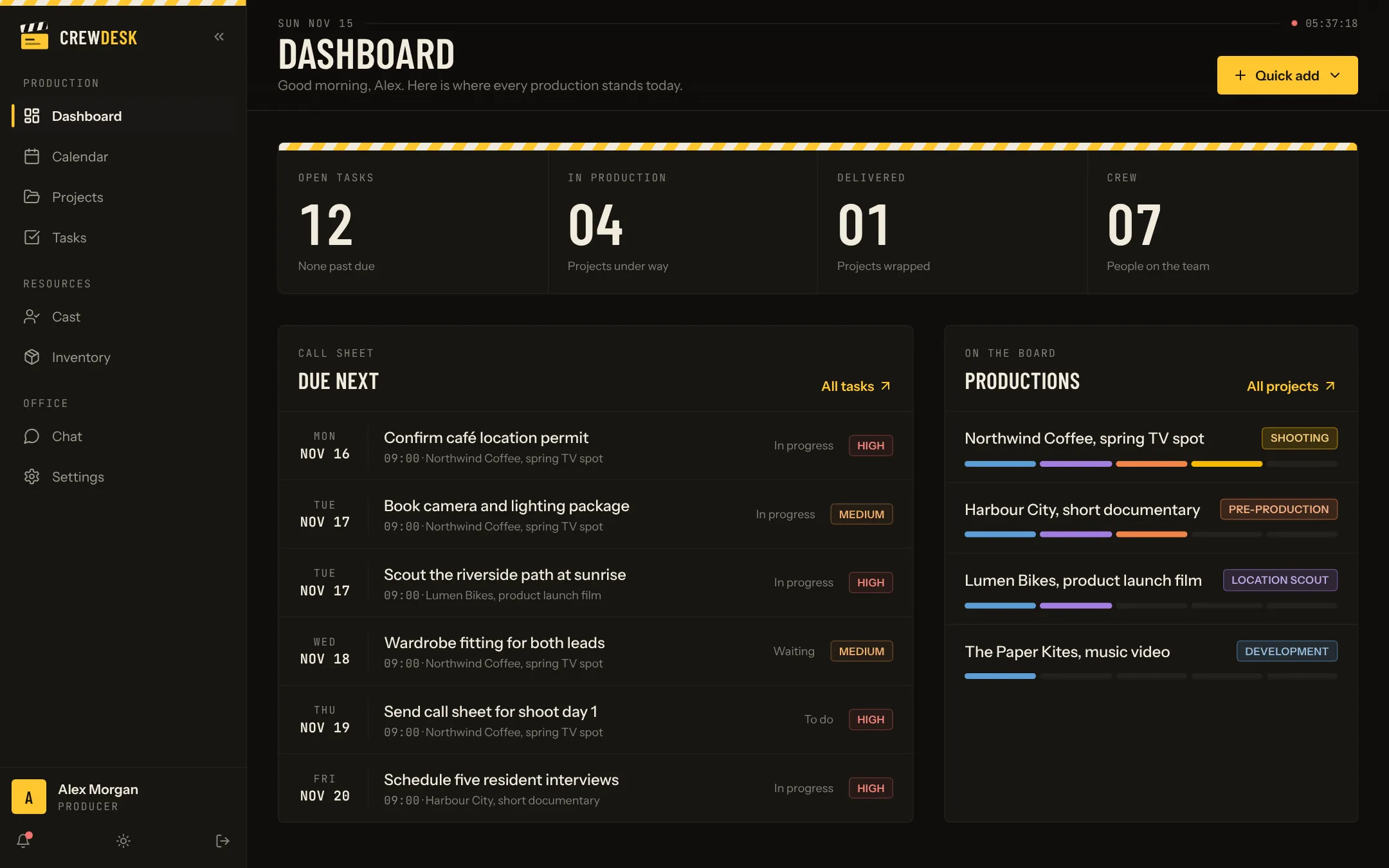
CrewDesk is production management software for film and video teams. Projects, tasks, the calendar, your cast, your gear and the team chat live in one place, from the first brief to delivery.
One click, no account. The demo is filled with sample productions and rebuilt every day.
Scene 01 · The problem
A shoot runs on details. Details get lost.
Most productions are run from a spreadsheet, three group chats and somebody's memory. It works until the day it does not.
Scattered
The schedule is in one file, the cast list in another, the gear list in an email from last month. Nobody is sure which version is right.
Invisible
A task is late and the producer learns it on the morning of the shoot. There is no single view of what is done and what is not.
Fragile
When the coordinator is away, half of the production's knowledge is away too. A new hire needs weeks to find where things live.
Scene 02 · The desk
Everything a production needs, in one app
Each part is useful on its own. Together they give the whole team the same picture.
Project tracking
Every production with its client, director, dates and stage.
Read more →02Task management
Owners, priorities and due dates, in a table or on a board.
Read more →03Production calendar
Month, week and day views of every production.
Read more →04Cast database
Profiles with sizes, availability and contact details.
Read more →05Equipment inventory
Cameras, props, wardrobe and set decor, with a location.
Read more →06Team chat
A team channel, direct messages and a thread per project.
Read more →07Roles and permissions
Producer, coordinator, assistant and crew see what they need.
Read more →08Documents and notes
Files and decisions attached to the project they belong to.
Read more →Projects
Each production, stage by stage
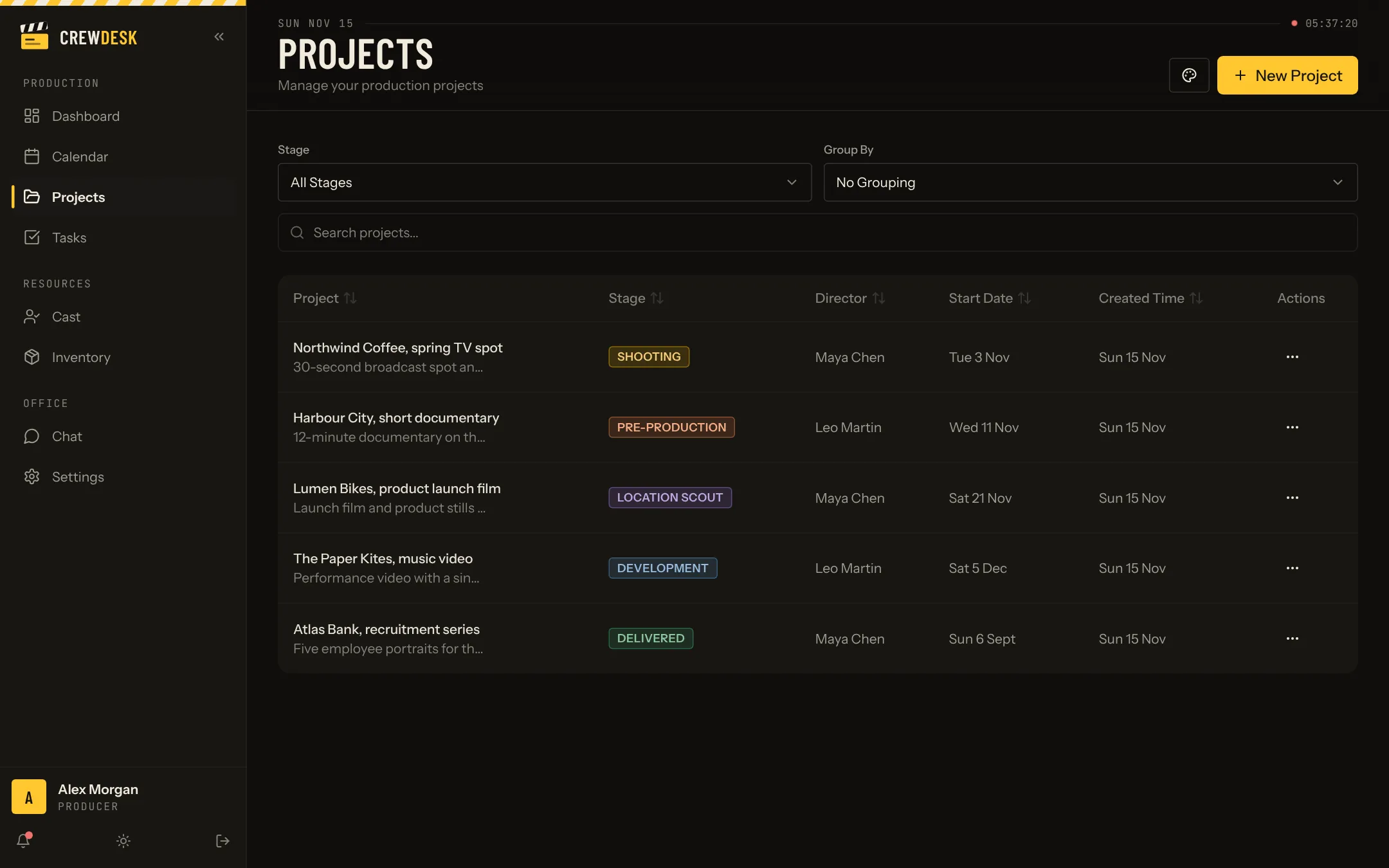
A project carries its client, director, location, dates and stage. One list shows where every production stands.
- Five stages, from development to delivered
- Table or card view, grouped the way you like
- A page per project with tasks, documents, notes, team and chat
Tasks
Who does what, by when
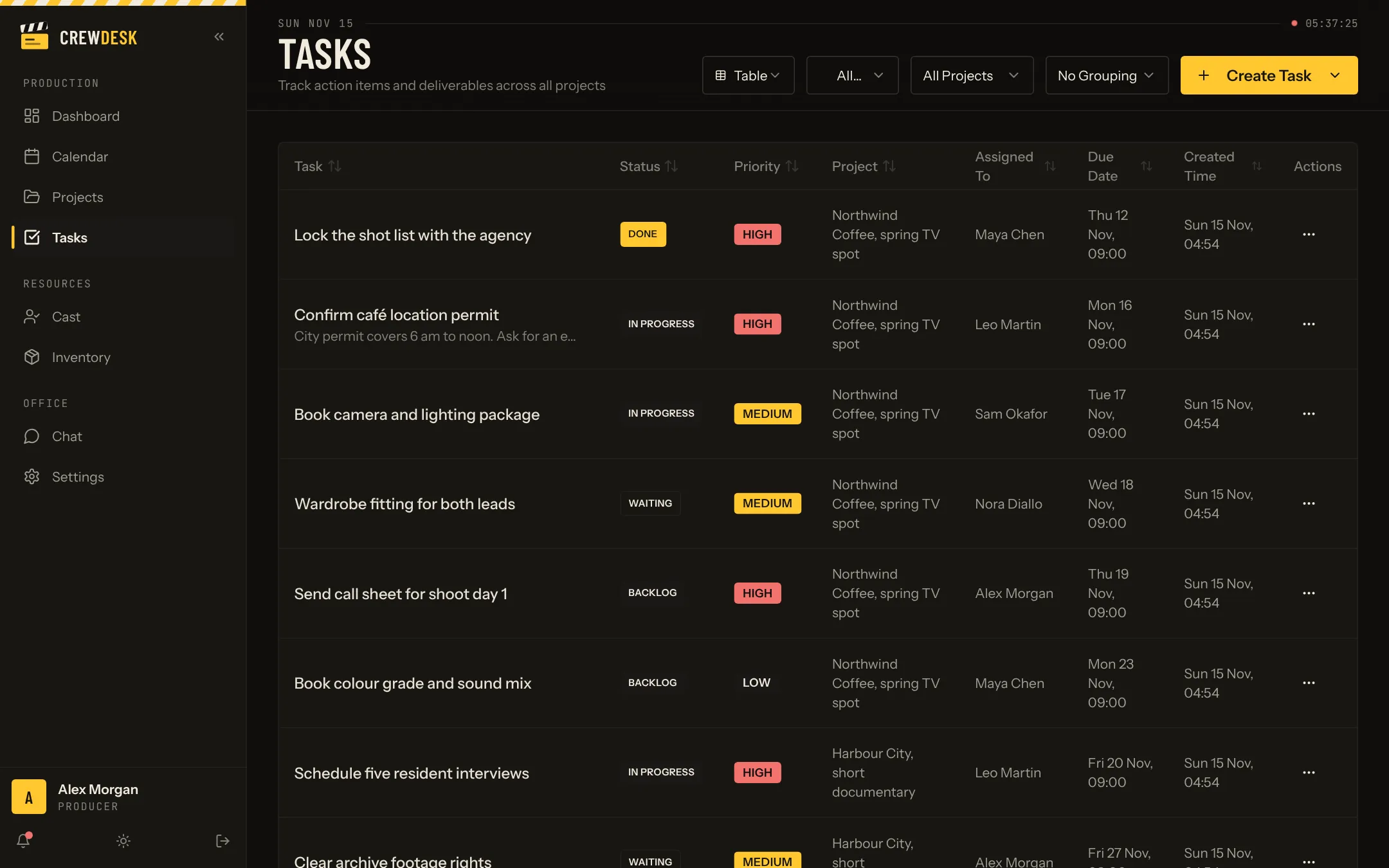
Every task has an owner, a priority and a due date. Late tasks show up before they become problems.
- Table and board views
- Filter by project, person or status
- Templates for the task lists you repeat on every shoot
Cast and gear
People and equipment, ready to book
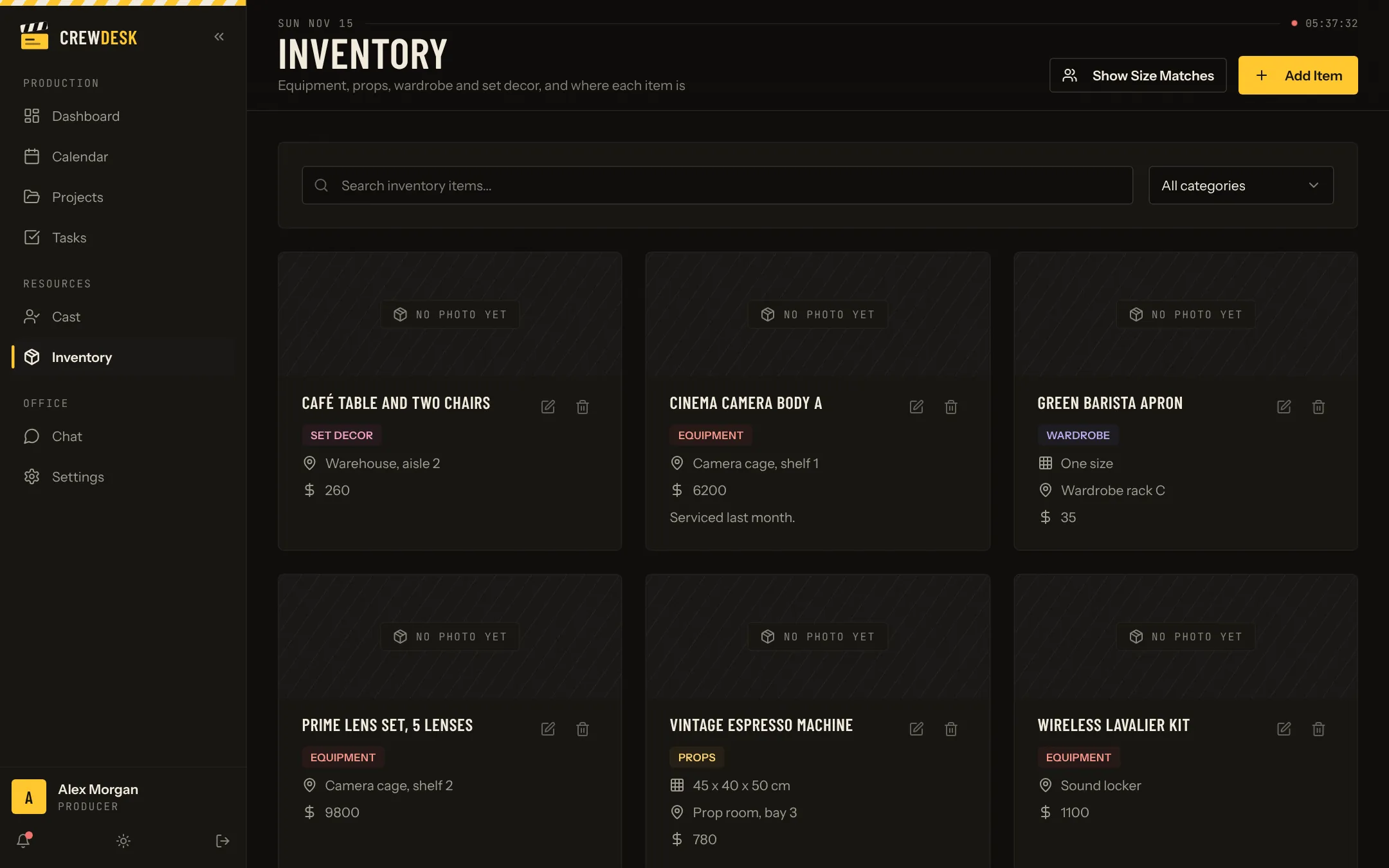
Cast profiles hold sizes, availability and contact details. The inventory knows where each item is. The two talk to each other.
- Search the cast by name or type
- Wardrobe that fits is suggested from the cast member's sizes
- Equipment, props, wardrobe and set decor in one inventory
Scene 03 · The workflow
Five stages, one strip of film
Every project moves through the same five stages, each with a colour you choose.
Development
The brief, the budget and the first conversations with the client.
Location scout
Visits, permits and the practical questions each place raises.
Pre-production
Casting, crew, gear, schedule. Everything that must be true on day one.
Shooting
The days on set. Tasks are short, urgent and assigned.
Delivered
Edit, grade, mix and delivery. The project is closed and kept on file.
Scene 04 · The teams
Made for teams that shoot
Video production companies
Several productions at once, one shared picture.
Read more →02Commercial production
Short timelines, many approvals, nothing forgotten.
Read more →03Documentary teams
Long projects, many people, a memory that lasts.
Read more →04In-house video teams
Requests from every department, one queue.
Read more →05Music videos
Small budgets, big crews, one long day.
Read more →06Photo studios
Shoots, models, props and gear in one place.
Read more →07Corporate video production
Many stakeholders, many versions, one place to follow them.
Read more →08Wedding videographers
Thirty weddings a season, each with its own timeline.
Read more →09Creative agencies
Video as one service among many, kept under control.
Read more →10Post-production houses
Versions, approvals and deliverables, each with a date.
Read more →11Event and live video
One chance, a hard start time, a truck to load.
Read more →12YouTube and content teams
A video every week needs a small production line.
Read more →13Film schools
Many student crews, one equipment room.
Read more →14Producers
See every production's real state in one screen.
Read more →15Production coordinators
The job of knowing everything, with a system behind it.
Read more →16Freelance crews
Day players who know where to be and what to bring.
Read more →Scene 05 · The offer
This is real software. You can have it.
CrewDesk is one of the applications TECHMA has built for clients. If it fits your team, there are three ways to get it.
Buy the source code
You get the code of the app and run it yourself.
On quote
- Full source code of the application
- Setup instructions for your developers
- Host it where you want
- Change anything, with no licence per user
TECHMA builds yours
We start from CrewDesk and shape it around your productions.
On quote
- Your stages, documents and vocabulary
- Connections to the tools you already use
- AI features where they save real time
- Training for your team
Managed for you
TECHMA hosts, updates and supports the app. You just use it.
On quote
- Hosting, backups and updates included
- Support when something is unclear
- Changes made on request
- One monthly invoice
Scene 06 · The notes
From the production office
Scene 07 · The library
Templates, definitions and comparisons
Everything we have written to help a production team get organized, whether or not it ends up using CrewDesk.
Templates
Seven production documents, explained field by field.
Read more →02Glossary
Forty production terms explained in plain words.
Read more →03Comparisons
CrewDesk next to Trello, Asana, monday.com, Notion and Airtable.
Read more →04Regions
Canada, the United States, Europe, Africa, Australia and New Zealand, city by city.
Read more →Free tools
Calculators, checklists and generators
Small tools for the questions every production asks. Free, no account, and what you type stays in your browser.
Aspect ratio calculator
Free calculator: pick an aspect ratio, enter a width and get the matching height in pixels, rounded to an even number for export.
Read more →02Call sheet generator
Fill in the day's details and get a clean call sheet to copy, download or print. Free, no account, nothing leaves your browser.
Read more →03Crew cost calculator
Free calculator: enter your crew size, day rates, shooting days, overtime, kit fees and employer costs to get the crew cost of a shoot.
Read more →04Day-Before Shoot Checklist
Use this free day-before shoot checklist to confirm crew, gear, location, weather, transport, catering and paperwork before your next production.
Read more →05Footage Transfer Time
Estimate transfer time for one copy or a sequential batch using file size and measured speed. This free calculator also shows throughput per hour.
Read more →06Location scout checklist
A free location scouting checklist you can tick on your phone or print: access, light, sound, power, safety and permissions.
Read more →From the blog
Fresh from the production office
How to plan a one-day corporate video shoot, from brief to wrap
A step-by-step plan for a one-day corporate video shoot: the brief, the scout, the schedule of the day, the crew and the client on set.
Read more →November 15, 2026Film Production Software for a Small Team: Where to Start
The best first step for a small production team is not to digitize everything. Learn what to organize first, how to choose software and what to check before moving your files.
Read more →November 15, 2026Video production software: what should it do in 2027?
A practical buying guide to the essential functions of video production software and the options that may be specialized. Assess an existing solution or decide when custom development makes sense.
Read more →Questions
Asked before the first call
What is CrewDesk?
CrewDesk is a web application for running film, video and photo productions. It keeps projects, tasks, the shooting calendar, cast profiles, equipment and team messages in one place, with roles that decide who sees what.
Can I try it without creating an account?
Yes. The live demo opens in one click with a shared demo account. It is filled with fictional productions, and the data is rebuilt every day, so you can change anything.
Who built CrewDesk?
TECHMA designed and built it as a custom application for a production company. The client's name and data are not shown. What you see is the same software with sample data.
Can my company get this app?
Yes, in three ways: buy the source code and run it yourself, have TECHMA adapt it to the way you work, or let TECHMA host and manage it for you. The three options are on the Get this app page.
Does it work on a phone?
Yes. The app has a phone layout with a bottom tab bar, so a producer on set can check a task or a contact in a few taps.
Is it only for film?
No. The same structure fits commercials, documentaries, corporate video, music videos and photo shoots. The demo uses film stages; a version built for you uses your own.
● Rolling
See it run.
CrewDesk is a working application, not a mock-up. Open it, move a project to the next stage, assign a task, and judge it on what it does.